
Showing posts with label Will Richardson. Show all posts

Friday, November 13, 2009

Purdue University in the Hotseat


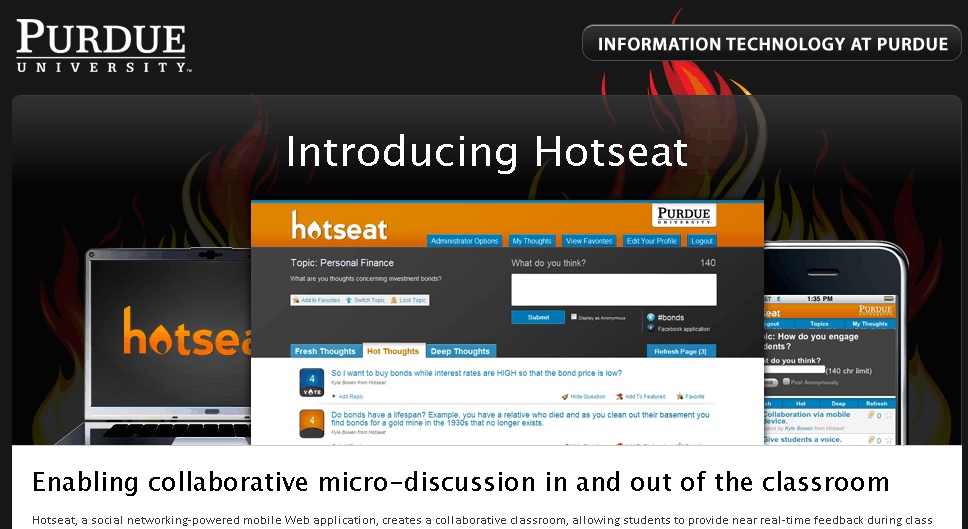
I recently came across this article about social networking, specifically Twitter, at Purdue University. (This one, too.) Seems that their IT people have developed their own social networking program called "Hotseat." The students in the classes are able to send out questions, comments, and so forth via this program, and from what I can tell, it also posts to their Facebook and Twitter accounts.

This has some very interesting possibilities within the classroom. I would likely use Edmodo for my classes since it is more secure and controlled, and it would take a good bit of training and reinforcement, but I can see where this might work. As I am delivering the lesson, students could post their comments and questions on the Edmodo account, which would be displayed on a separate screen. The students could then answer each other's questions, posting links and whatnot related to the class discussion.

Of course, this would take some training and practice, particularly with my younger students since the temptation for "What up?" and other non-related and therefore inappropriate messages might be too great. Perhaps if/when I roll this out, I would start with my TOK class, then moving down to the sophomores, either not using it with the freshmen or waiting until perhaps fourth quarter to introduced them to it.

Which brings me to my struggle this year. With the new district policy around pacing, I am supposed to be pretty much doing the same thing as the other classes in the building (aside from TOK, which is unique to IB). At least at first glance, this precludes the use of blogs and other technology in the classroom which is a huge disservice to my students. As Will Richardson has observed, those who aren't publishing (online) aren't a part of the conversation. We saw the use and power of technology in the last federal election cycle and in the protests over the election in Iran; if our students do not know how to utilize those and other 21st century tools, they will not be able to be active citizens in their own democracy. While this may sound like hyperbole, it isn't. It's simple fact. I'm seriously worried.

Sunday, June 8, 2008

Will Richardson blog

Found Will Richardson's blog tonight (he's the author of the book we were given at training, just in case you forgot: Blogs, Wikis, Podcasts, and Other Powerful Web Tools for the Classroom). The link to it is here. His entry from a couple of days ago resonates with me a bit... he makes the point that education is fairly slow to respond to the changing technology, and I think that for the most part, that statement is true, and it's a real problem. Education should be on the forefront of these changes, not bringing up the rear and only because we are being dragged kicking and screaming into doing so. I can think of more than a few of my colleagues (and not just teachers within the district) who are downright Luddite when it comes to the most basic technology, even email. We are in a society where that is no longer acceptable. Ultimately, I feel that our job is to prepare young people for successful lives beyond high school, regardless of how that looks, and if we do not do so, then we are failing our students, their parents, and ourselves. The world of the 21st century is technology based and technology driven. If we don't embrace it, we are dooming our children to be left far, far behind.

(Cross posted to my "teacher blog.")

Tuesday, June 19, 2007

RSS Tricks and Tips


Real Simple Syndication (RSS) is a method for organizing content on the Internet so the content comes to you rather than you looking for content. I have been using RSS to track the blogs I read for two years. Today in Will Richardson's (photo credit) session I learned new ways to use RSS that are useful and relevant to teachers and students. Here are the three coolest things I learned:
(1) News searching. Go to Google News and perform a search. For example, "educational technology". This search covers 4,500 (mostly) newspapers. Once the search is completed on the left-side of the page you will see RSS. Click the RSS hyper-text and you will get the feed. Add the feed to your reader. Now any time a new article is published on educational technology in one of the 4,500 newspapers you will be notified in your reader (Google Reader or Bloglines). In addition, using the advanced search feature in Google News you can restrict by publication.
(2) YouTube RSS: If you want to subscribe to Youtube videos by tag (or keyword) you can do this through your reader. Here is how you do it: first, copy this feed: feed://www.youtube.com/rss/tag/monkey.rss into a web browser. Change "monkey" to the keyword you want to track videos on. For example, if you wanted to know if any new videos were posted on "Darfur" you could create a RSS feed for Youtube using this method and any new videos would post to your reader.
(3) Google Calendar: Several of the teachers in the Global Learners Project (Jeff Lewis, Kelly Schwichtenberg, and Emily Taylor) were smitten with Google Calendar and have decided that their school will use it next year for IB Units and as a school calendar at Alsup Elementary School. Under "Manage Calendars" click the calendar that you want an RSS feed for. At the bottom of the page is a button that says "XML". Click that button to reveal a web address that is a RSS feed. Copy that feed to your Reader. Be sure to make your calendar "public" in order to use this RSS feature. Parents could subscribe to the school's calendar and know when it was updated with new events. How cool would that be?

MIT Open Courseware

This morning Will Richardson introduced the crowd at TIE Colorado to MIT Open Courseware. This is a site at MIT that posts the content, including audio and video of courses. All these courses can be taken for free online. This is a really neat site that opens doors for all of us.

Are there any Global Learners that would be willing to post their course guides, video and audio from their classroom?